Dashboards on Top of a Spreadsheet You Talk To
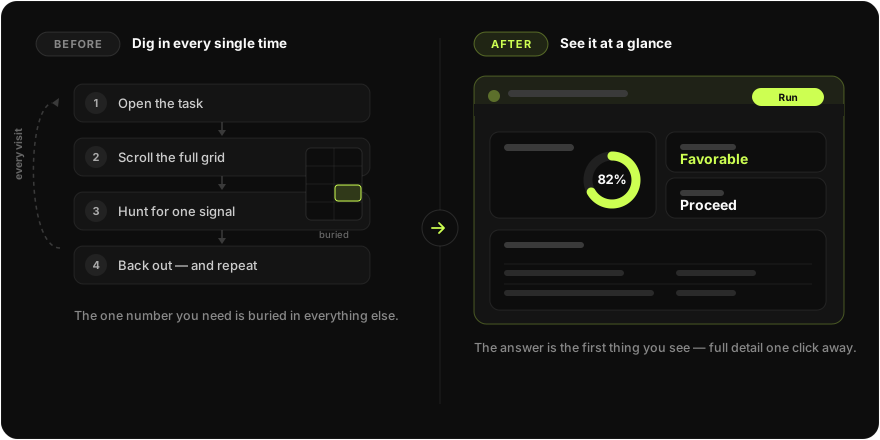
A tool does a pile of work for you. It produces a long report, or a table with a few hundred rows, or a dozen results. And then, to get the one thing you actually came for — is this still worth my time? — you open it, scroll, find the number, and back out. Tomorrow you do it again. And for the next item, and the one after that.
That re-navigation tax is small once and crushing at scale. This is the story of how we removed it: a dashboard layer that sits on top of a working tool and shows the few things that matter, always current, without making anyone open the tool. It's also the story of a design decision that turned out to matter more than any single feature — making the dashboard the fundamental thing, and the widgets on it disposable.
The tool underneath: a spreadsheet you talk to
To make the rest concrete, here's the engine the dashboards sit on. We call it the List Builder. Picture a grid of data — rows and columns, like Excel or Google Sheets — except you don't edit it by hand. You talk to it. You type "pull the latest figures for each row" or "drop anything below this threshold," and an AI fills, enriches, and reshapes the grid for you. Each of those working sessions is a conversation, and a conversation can leave behind a grid with hundreds of rows across several sheets.
You don't need to know the domain we built this for. All that matters is the shape of the problem: the List Builder produces a lot, and the answer you want is a small slice of it. Once you've run it a few times, the cost isn't the work — it's getting back to the conclusion every time you check in.
What a dashboard is here
A dashboard, in this system, is a small, always-current summary that lives on top of the List Builder. Think of a car's dashboard: you don't pop the hood to check your speed — the gauge is already in front of you. Same idea. The full grid is still there, the full detail is one click away, but the things you check daily are surfaced so you never have to dig for them.
The end users split into two roles. A builder configures a dashboard once — decides what questions it answers and how they're displayed. An analyst just opens their work and reads it. The builder sets it up; everyone else benefits, on every conversation, forever.
The decision that shaped everything: the dashboard is the noun
When we started, the instinct was to think in widgets — a news widget, a metrics widget, a chart widget — each a thing you build. That's the wrong center of gravity, and it's worth saying why, because it's the most important idea in this post.
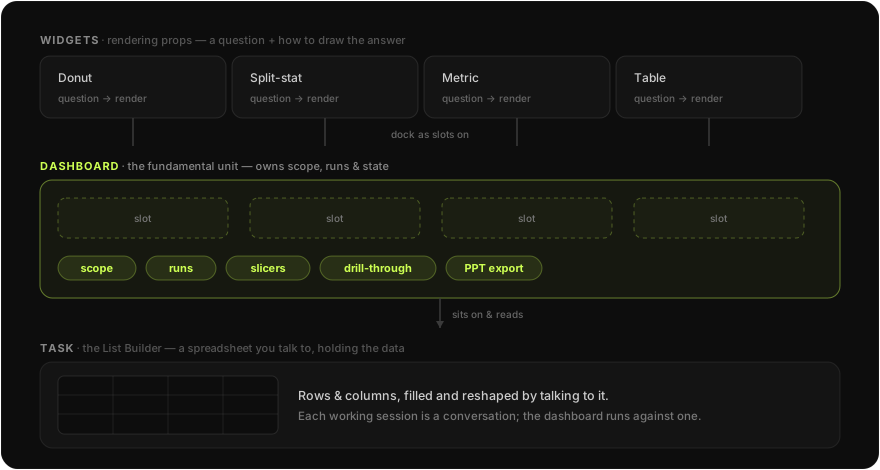
A widget is not a fundamental object. It's a rendering prop. Concretely, a widget is just two things: a question and instructions for how to display the answer. It owns no data and no scope of its own. At runtime it asks its question against the underlying task's data and gets back a small structured result, which gets drawn as a chart, a metric, or a table. Change the question or the display instruction and you have a different widget — no new code, nothing fundamental added to the system.
The dashboard is the fundamental object. It's the thing that has an identity, a scope, and a lifecycle. It decides which conversation it's looking at, holds the run history, filters the data, and knows how to put itself back together every time you open it. The widgets are just slots arranged on its surface.
Getting this hierarchy right is what made the rest tractable. Once the dashboard is the noun and widgets are props, "add a new kind of widget" stops being an engineering project and becomes configuration.
What the dashboard consumes
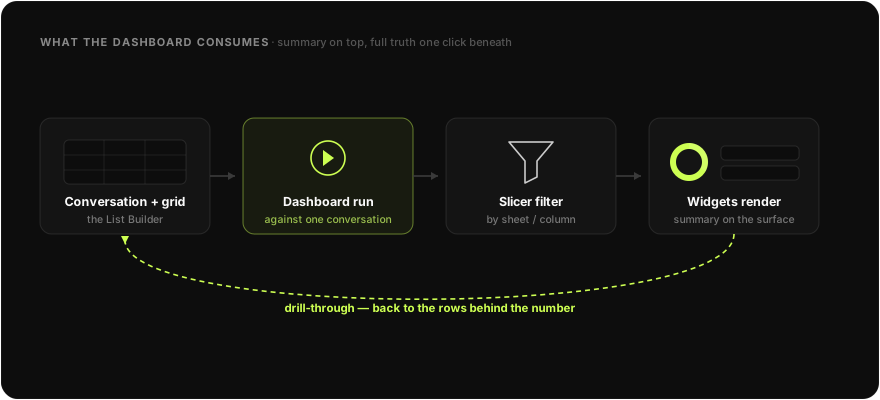
Because the dashboard sits on the List Builder, everything it shows is derived from real grid data, not a separate copy.
When you open a dashboard, it runs against a conversation — one of those talk-to-it sessions and the grid it produced. You can point it at a different conversation from a dropdown, and it re-derives everything for that one. It can slice the data — filters defined directly in terms of the grid's sheets and columns, so "only show rows where status is active" is a real query against the real grid. And from any summarized widget you can drill through back into the underlying sheet — the rows behind the number, read-only, so the summary and the source never disagree.
That's the whole contract: summary on top, full truth one click beneath it, and the summary is always computed from the truth.
How the dashboard actually works
Here's where it gets technical. The dashboard exists in two phases.
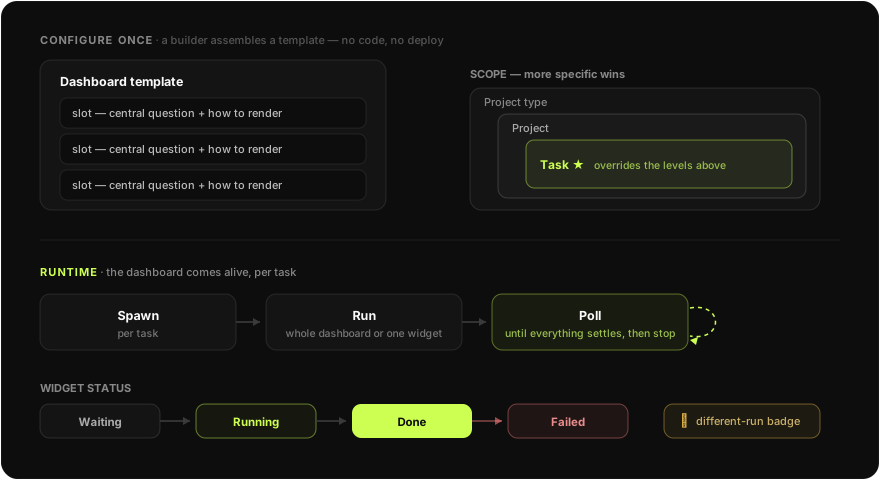
Configure once. A builder creates a dashboard template and attaches widget slots to it. Each slot is the question-plus-display-instruction I described — a central question, the expected shape of the answer, and guidance for how to render it. The template is scoped at one of three levels: a single task, a whole project, or an entire project type (a class of tasks). More specific scopes win, so you can set a sensible default for a whole class and override it for one case without duplicating anything.
Come alive at runtime. When an analyst opens a task that has a dashboard, the system spawns a runtime dashboard for it. Now it's a live object: it resolves which template applies, picks up the latest conversation, and is ready to run.
Running is where the lifecycle shows up. You can run the whole dashboard or re-run a single widget. Each widget moves through clear states — waiting → running → done, or failed — and while anything is still running, the dashboard polls until everything settles, then stops. No guessing, no spinning forever: it asks the server what's true and quits when the answer stops changing. The dashboard tracks runs as a history, not a single value, so it can tell when one widget's result came from a different run than the rest — and it flags that with a small badge, because a stale tile next to fresh ones is exactly the kind of quiet wrongness that erodes trust in a dashboard.
Every non-happy state is designed on purpose: a widget that hasn't run yet, one that's mid-run, one that returned nothing, one that failed. Those aren't afterthoughts bolted on at the end — they're most of what makes a live data surface feel reliable instead of flaky.
Widgets as rendering props: one renderer, many shapes
Now the widgets, deliberately discussed after the dashboard, because that's their actual importance.
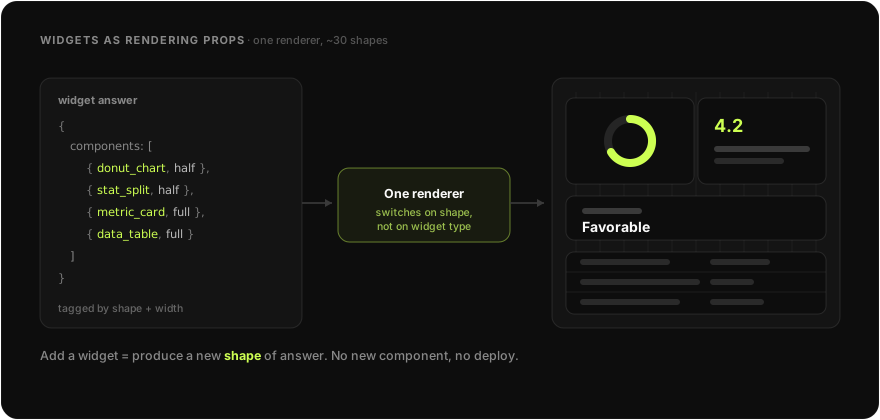
When a widget runs, its answer comes back as a small, structured payload — essentially a list of display components, each tagged with what it is (a donut, a split-stat, a metric card, a table) and how wide it should be. A single renderer takes that payload and draws it: it lays the components out on a twelve-column grid at full, half, or quarter width, and for each one it picks the matching visual from a library of around thirty micro-components.
The important property is what's absent: there is no if (widgetType === 'news') anywhere. The renderer doesn't know about widget types at all. It knows about output shapes. A widget produces a donut-shaped answer and a donut appears; produce a table-shaped answer and a table appears. Adding a new kind of widget means producing a new shape of answer — not registering a new component in code and shipping a deploy.
This is the concrete payoff of treating widgets as props: one declarative renderer instead of a growing pile of bespoke widget components that drift apart over time.
Making one dashboard serve everything
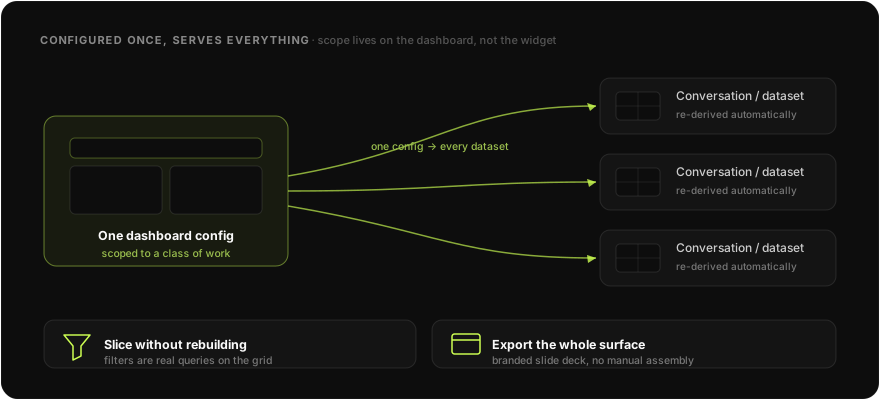
The last piece is reuse, and it falls out of the scoping model. Because a dashboard is configured once and scoped to a class of work, the same dashboard adapts to every conversation and dataset that falls under it. You don't rebuild it per item. You point it at a conversation and it re-derives; you apply a slicer and it filters; you export the whole surface — for example, to a branded slide deck — and you have something to share without assembling anything by hand.
One configuration, every dataset, every visit. That's only possible because the dashboard — not the widget — is the unit that carries scope.
The payoff
Back to where we started. The buried number is now the first thing you see. The morning check that used to mean opening a tool, scrolling a grid, and backing out is a glance at a surface that's already current — and when you do want the detail, it's one drill-through away, reading from the same data the summary was computed from.
And because the dashboard is the fundamental object, the surface isn't welded to this one tool. The List Builder is what we built it on first, but the same dashboard layer can sit on top of other task types — a code-writing task, anything that produces more output than you want to wade through. The widgets change; the dashboard doesn't have to.
Lessons
A few things I'd carry to the next system like this.
Pick the right noun. We almost made the widget the fundamental unit. Making the dashboard fundamental — the thing that owns scope, runs, and state — and demoting widgets to rendering props is what turned "add a widget" from an engineering task into configuration.
One renderer beats many components. A single renderer that switches on the shape of the data scales; a bespoke component per widget type drifts and rots. Push the variability into declarative output, not into code.
A live surface defers to the source of truth. Poll until the data settles, then stop. Drill-through reads the same rows the summary came from. The dashboard never holds a clever local copy it has to keep in sync — it re-derives.
Design the unhappy states first. Waiting, empty, failed, stale — these are most of the experience of a data surface that updates over time. Treating them as first-class, including a badge for "this tile is from an older run," is the difference between a dashboard people trust and one they double-check.
Built with clarity over cleverness.